Contact Us




Purchase Order
What was ordered
Items, quantities, prices and delivery terms
 ×
×

ZYNO Procurement · GRN Management
ZYNO is GRN management software that helps teams record incoming deliveries, verify received goods against purchase orders, and keep approved goods receipt information connected to inventory management and invoice matching.
When a delivery arrives, your team needs to know what was ordered, what actually arrived and what needs attention. ZYNO helps receiving, procurement and finance teams manage delivery logging, verification, inspection and approval in one connected workflow.
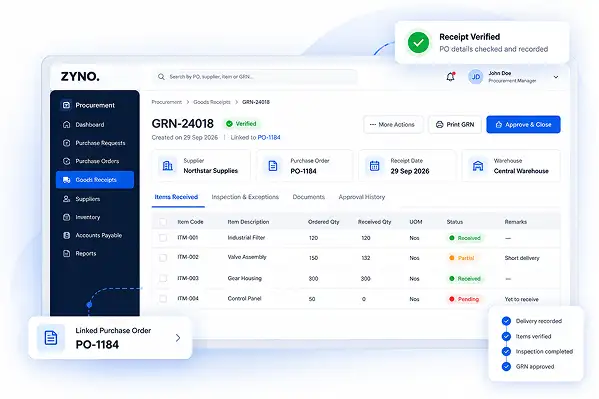
GRN Software, Explained
GRN software is a digital system used to record and verify goods received from suppliers against purchase orders. It helps teams capture received items and quantities, identify discrepancies, complete receiving and approval steps, and connect verified receipt information with inventory and invoice workflows.
A Goods Receipt Note (GRN) records what was actually received from a supplier. Comparing the GRN with the purchase order helps the receiving team identify differences between what was ordered and what arrived before the receipt moves forward.
ZYNO's goods receipt note software connects delivery logging, purchase order verification, inspection, approval and downstream updates as part of a broader procurement workflow. Teams can review what arrived, document exceptions and keep verified receipt information connected to the purchasing process.
Related workflow: purchase request management
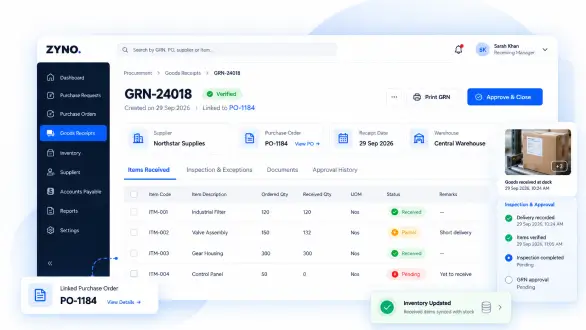
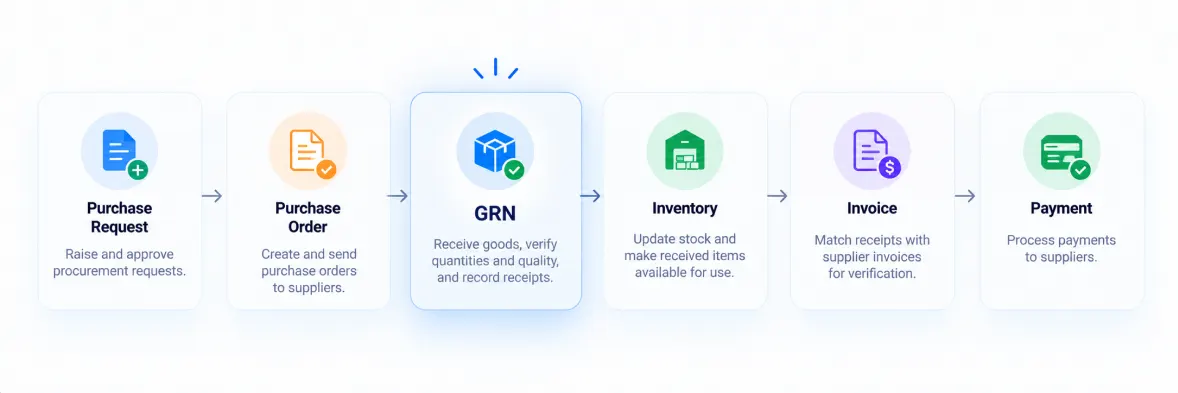
GRN in the Procurement Lifecycle
A Goods Receipt Note plays an important role in the procure-to-pay process by recording what a business actually received against what it ordered.
Purchase Order
Goods Delivered
GRN Created
Inspection & Verification
Inventory Updated
PO + GRN + Invoice Matching
Payment
After delivery, the GRN can be reviewed against the purchase order, inspected for discrepancies, connected to inventory updates, and used alongside the purchase order and supplier invoice during three-way matching.
Connected procurement flow
Purchase OrderGoods ReceiptInspectionInventory UpdateInvoice MatchingPayment
ZYNO connected procurement workflow
ZYNO connects goods receiving with the wider procurement workflow, so the GRN remains connected to the purchasing information used by procurement, warehouse and finance teams.
The Receiving Process
Receiving issues often start when delivery details are recorded late, order checks are done manually or teams cannot see what needs review. A connected GRN process helps the team document deliveries and resolve exceptions while the information is still easy to verify.
Challenge 01 · Receiving
Log incoming goods against the relevant purchase order, so the receipt record is connected to the order from the start.
How It Works
ZYNO connects each stage of goods receiving so the receipt stays linked to its original purchase order and verified information can move into the next step.
Record incoming goods in the GRN software and link each delivery to its purchase order. Enter receiving details on mobile or desktop, attaching photos when needed.
| Item Code | Item Description | Ordered Qty | Received Qty | Status |
|---|---|---|---|---|
| ITM-001 | Industrial Filter | 120 | 120 | ● Received |
| ITM-002 | Valve Assembly | 150 | 132 | ● Partial |
| ITM-003 | Gear Housing | 300 | 300 | ● Received |
Related: procure-to-pay workflow · purchase request management
GRN Management
ZYNO GRN management software brings delivery records, purchase order checks, exception handling and downstream updates into one connected workflow. Teams can see what has arrived, what needs review and what can move to the next step.
Compare received items and quantities with the purchase order. Review quantity, price or SKU differences before confirming the goods receipt.
Capture at Receiving
Goods can arrive with item labels, shipment references and supporting documents that the receiving team needs to check. ZYNO supports barcode and QR code scanning during goods receiving to help capture item information and associate received goods with the relevant GRN and purchase order.
Review captured details against the purchase order, then follow the required inspection and approval steps before the receipt moves forward. Keep relevant shipment details and supporting documents associated with the receiving record when they are available in the workflow.
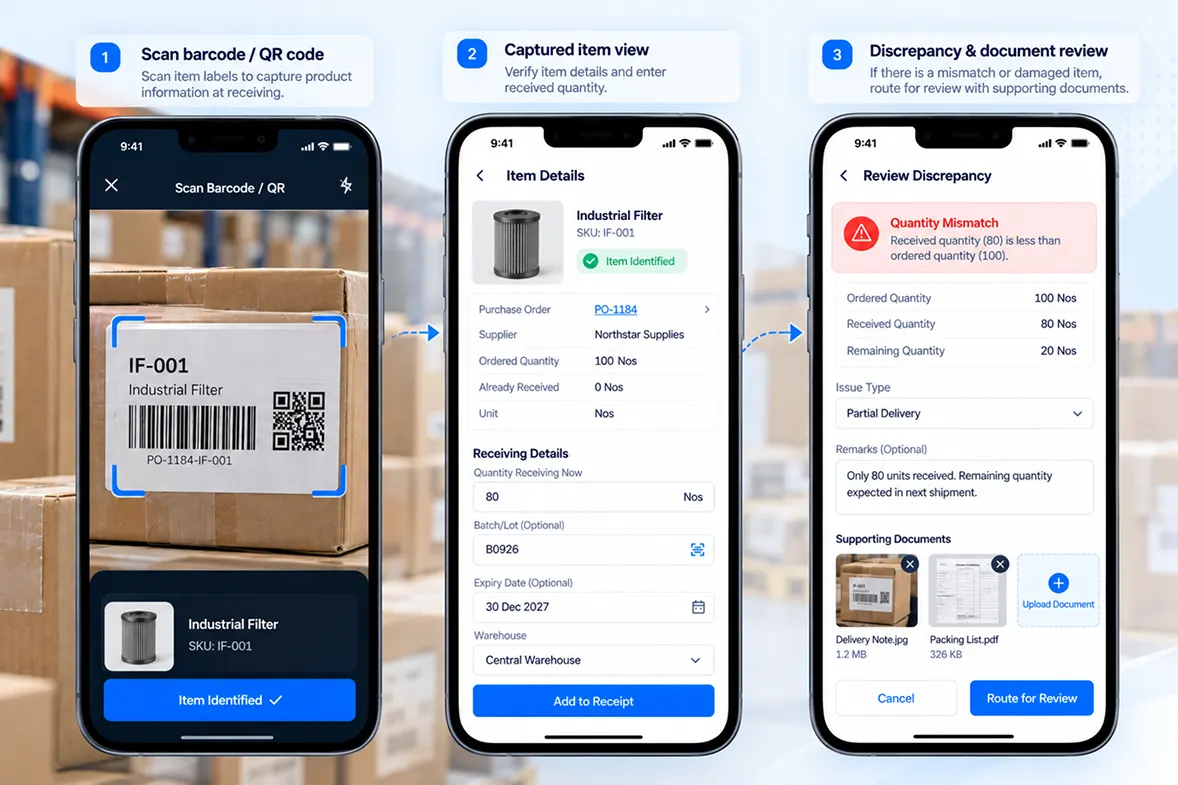
Record the quantity received so far and keep it linked to the purchase order. Continue documenting the delivery as the remaining goods arrive.
Attach photos of damaged or disputed items and keep the evidence with the receipt record for inspection.
Review flagged quantity, price or SKU differences against the purchase order and decide the next action through the receiving workflow.
Related: vendor portal · vendor management
Exception Handling
Not every delivery arrives exactly as ordered. A receipt may need a quantity check, inspection or approval before it can proceed.
ZYNO keeps the receipt connected to its purchase order and supports review of flagged deliveries through the receiving workflow.
Teams can record partial quantities, document damaged or disputed goods and route flagged receipts for inspection and sign-off. The review stays associated with the receipt, helping procurement and receiving teams follow up without losing the context of the original order.
The workflow keeps exceptions visible so the appropriate team can review and resolve them before the receipt proceeds.
Connected Records
A goods receipt note is more than a delivery document. It connects what was ordered, what arrived and what happens next.
ZYNO connects verified receipt information with inventory management and finance workflows, helping teams work from the same receiving record.
What was ordered
Items, quantities, prices and delivery terms
What was received
Received items, quantities, inspection and approval
What is being billed
Supplier invoice details and amounts
Stock updated
Synchronize receipt details with inventory across warehouses
Verified receipt details synchronize with stock information across warehouses, keeping inventory records connected to incoming goods.
Finance teams need to know whether the goods recorded in a GRN align with the purchase order and supplier invoice.
ZYNO feeds GRN data into the three-way matching process, connecting the receipt record with the purchase order and invoice review.
This helps teams identify receipt-related differences and gives procurement and finance a shared record to refer to when resolving a discrepancy.
AI-Assisted GRN Review
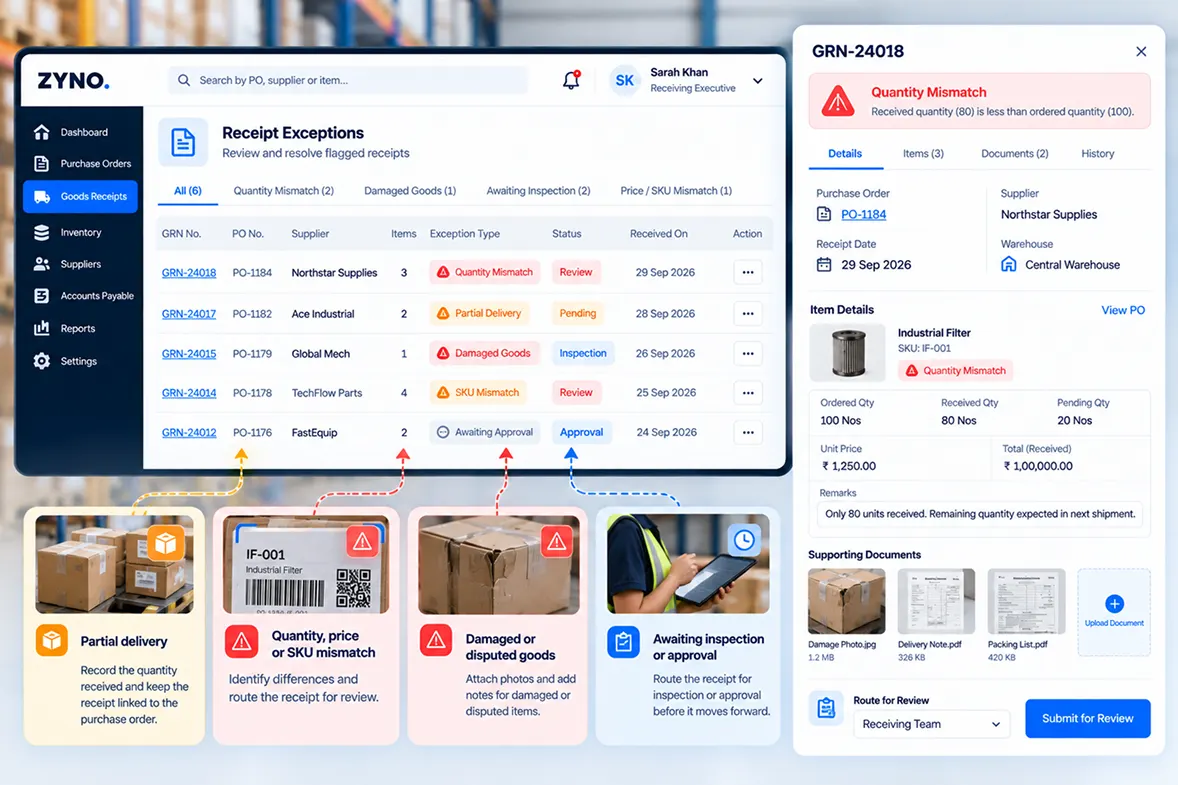
ZYNO uses AI-assisted capabilities to identify potential discrepancies in goods receipt information and bring them into focus for review. Instead of requiring teams to review every receipt manually, flagged differences can be organized into exception reports and routed through the appropriate inspection and approval workflow.
Receiving Exceptions
AI-assisted analysis to highlight potential discrepancies
| GRN No. | PO No. | Supplier | Items | Issue | AI Suggestion | Status | Action |
|---|---|---|---|---|---|---|---|
| GRN-24018 | PO-1184 | Northstar Supplies | 3 | ▲ Quantity Mismatch | Check received qty | Review | ••• |
| GRN-24017 | PO-1182 | Ace Industrial | 2 | ▲ Price Mismatch | Verify invoice price | Pending | ••• |
| GRN-24015 | PO-1179 | Global Mech | 1 | ▲ Damaged Goods | Inspect and confirm | Inspection | ••• |
| GRN-24014 | PO-1178 | TechFlow Parts | 4 | ▲ SKU Mismatch | Match with PO items | Review | ••• |
| GRN-24012 | PO-1176 | FastEquip | 2 | ◷ Pending Inspection | Schedule inspection | Pending | ••• |
Industrial Filter
✦AI Suggestion
Bring possible differences in received quantities, prices or item details to the team's attention for review.
Group flagged receiving issues so procurement teams can quickly see what needs follow-up.
Send relevant receipts through inspection and approval workflows before they move forward.
AI-assisted GRN review supports GRN automation by helping teams identify receipts that need attention while keeping inspection, approval and decision-making with the appropriate teams.
AI-powered procurement software · AI-based invoice verification
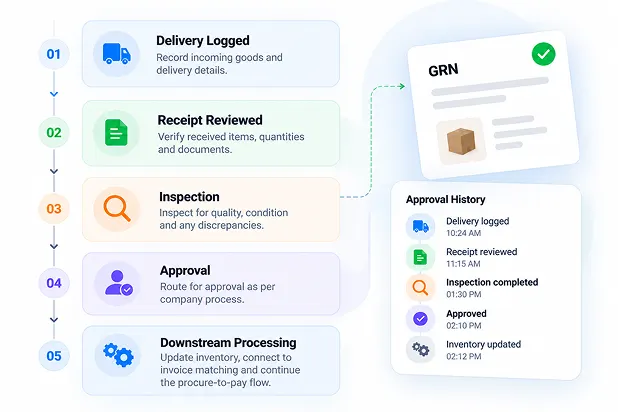
Traceable Receipt Records
When teams need to resolve a delivery question, they need to find the right receipt and understand what happened.
ZYNO keeps receipt information and related review activity connected, giving teams a record they can refer back to when checking a delivery, following up on a discrepancy or reviewing an approval.
Keep receipt details, supporting evidence and inspection or approval history together so the receiving process is easier to follow across procurement, operations and finance.
Connected Teams
ZYNO connects receiving, procurement, approvers and finance around the same receipt record.
Log deliveries, capture item and quantity details, and document goods that need review.
Review receipts against purchase orders and follow up on mismatches.
Review partial or flagged receipts and complete the required sign-off.
Use GRN data in three-way matching with purchase orders and supplier invoices.
ZYNO connects goods receiving with the ERP, WMS and procurement systems your teams already use. Bring GRN information into the receiving workflow, keep purchase and warehouse records connected, and pass verified receipt information into downstream invoice and finance processes.
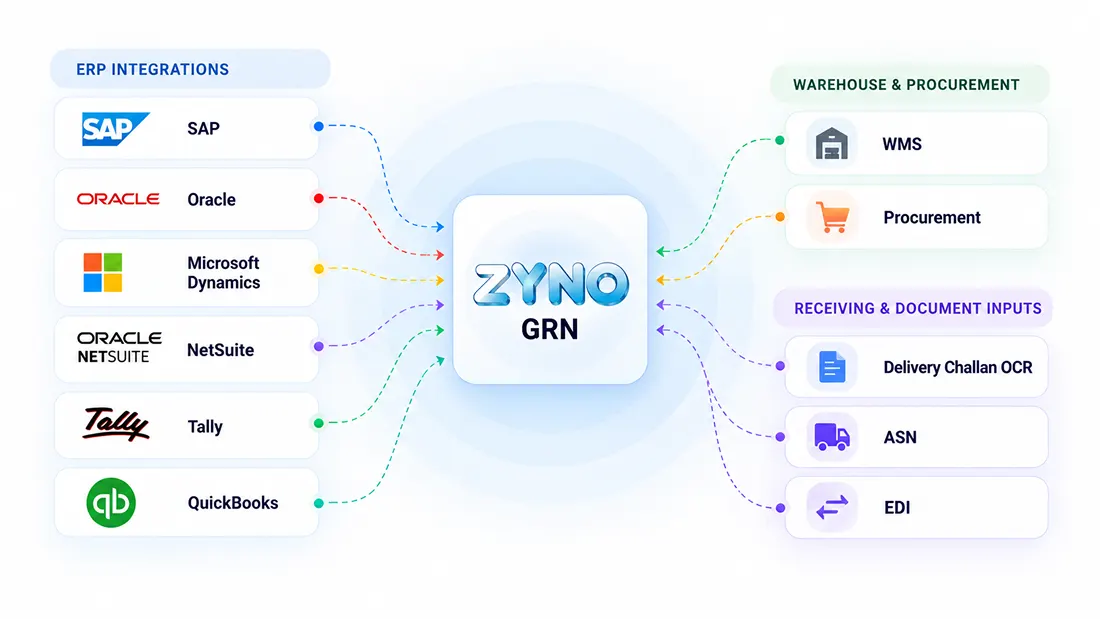
Connect GRN and purchase-order information with supported ERP and accounting environments.
Connect GRN information with WMS and warehouse systems so verified receiving data can support inventory updates and visibility.
Keep goods receiving connected with procurement workflows across requests, purchase orders, vendors and procure-to-pay activities.
Support receiving workflows that use document capture and structured data exchange.
The exact integration method, supported version and data flow can depend on the systems and implementation requirements. During a demo, teams can review which records need to move between procurement, receiving, warehouse and finance.
Fit Your Procurement Workflow
Your GRN does not operate in isolation. It sits between purchasing and the downstream inventory and finance processes that depend on verified goods receipt information.
With ZYNO, teams can connect the GRN to the purchasing, inventory and invoice workflows already used across the business.
During a demo, walk through your current receiving process, systems and information flows with the ZYNO team.
Customer Story
Every receiving process has its own challenges. The right workflow helps teams keep delivery information connected to the original purchase, identify exceptions and know what needs attention next.
“Before ZYNO, it could be difficult to keep track of what had actually arrived. Now our team has a much clearer view of received goods and anything that needs to be checked.”
“ZYNO has made the receiving process much easier for our team. We can see the delivery details, check them against the order, and move things forward without so much back and forth.”
“What I like about ZYNO is that we can see what was ordered and what was actually received in one place. If something doesn’t match, our team knows it needs attention.”
“With ZYNO, our receiving team has a simpler way to record deliveries and flag anything that doesn’t look right. It makes follow-up much easier.”
“We deal with a lot of procurement activity, so having receiving information organized in one place has been really helpful. Our teams can see what has arrived and what still needs follow-up.”
“ZYNO gives us a clearer picture of the goods coming in. Our team can keep the receiving information connected to the purchase and quickly see when something needs to be reviewed.”
“The biggest difference for our team is having the receiving details connected to the original purchase. It’s much easier to understand what came in and what needs to happen next.”
Want to see how ZYNO could support your receiving workflow?
Walk through your
current goods receiving process with our team.
Case Studies
See how organizations have used ZYNO and related Elite Mindz solutions to manage goods receiving, procurement workflows and connected operational requirements.

Hockey India used ZYNO to bring goods receiving and procurement activities into a more connected digital workflow.
EaseMyTrip's procurement environment included vendor management, purchase orders, quotations and receiving activities.
PVR implemented an Electronic Register for purchase orders, GRNs, RFP tools, tender management and approvals.
FAQ
A Goods Receipt Note (GRN) is a record of goods received from a supplier, usually against a purchase order. It documents what was delivered, helps teams identify differences between ordered and received goods, and provides receipt information for inventory and invoice processing.
A GRN in procurement records the goods a business actually receives against a purchase order. It helps procurement teams verify deliveries, document discrepancies, update inventory and provide receipt information for invoice matching.
The GRN process typically includes recording the delivery, linking it to the purchase order, verifying received items and quantities, handling discrepancies or inspection, approving the receipt, updating inventory and using the verified GRN for invoice matching.
Three-way matching compares the purchase order, goods receipt and supplier invoice to help verify that the ordered, received and invoiced goods and amounts align before payment.
A GRN in an ERP system records goods received against a purchase order. It gives procurement, warehouse and finance teams a shared record of delivered items and quantities and can support downstream inventory and invoice workflows.
A purchase order records what a business intends to buy, while a GRN records what was actually received. Comparing the two helps teams identify quantity, item or other receiving differences before the process moves forward.
A GRN records incoming goods and provides the receiving information needed for stock updates after verification. It also gives teams a reference for checking what arrived against the original purchase order.
Goods receipt note software helps teams record, verify and manage incoming deliveries. Depending on the system, it can support purchase order matching, discrepancy handling, inspection and approval, inventory updates and invoice matching.
ZYNO's GRN workflow compares received information with the linked purchase order and can flag quantity, price or SKU differences for review. The workflow also supports inspection, approval and a timestamped receipt history.
Yes. ZYNO supports partial receipts against a purchase order. Partial or flagged receipts can move through inspection and sign-off while remaining connected to the original purchase order.
Yes. ZYNO's digital receiving workflow allows teams to log deliveries from mobile or desktop and attach photos to damaged, incomplete or disputed receipt records. Flagged receipts can then move through inspection and approval.
Yes. ZYNO supports barcode and QR code scanning as part of its goods receiving workflow to help capture item information during receiving. Teams can then review the captured details against the purchase order and handle discrepancies through the receiving workflow.
ZYNO's receiving workflow supports recording deliveries against the relevant purchase order as goods arrive. If your process requires multiple receipts against a single purchase order, confirm the exact configuration and handling with the ZYNO team during a demo.
Yes. ZYNO connects GRN information with three-way invoice matching, where the purchase order, goods receipt and supplier invoice are checked together.
Yes. ZYNO's GRN workflow connects verified receipt information with inventory updates across warehouses, while its inventory management capabilities support stock visibility across warehouse locations.
A GRN typically records the supplier, purchase order reference, received items, quantities and receipt date. Depending on the organization's process, it may also include discrepancy, inspection and approval information.
Manual goods receiving often requires teams to enter delivery details and compare them with purchase orders manually. Goods receiving software can help capture information, identify differences and route exceptions through a defined workflow while keeping people involved in review and approval.
A GRN scanner is a scanning tool used during goods receiving to capture item or delivery information for a receipt record. ZYNO supports barcode and QR code scanning as part of its digital receiving workflow.
Yes. ZYNO supports integration with supported ERP and accounting environments, including SAP, Oracle, Microsoft Dynamics, NetSuite, Tally and QuickBooks. Integration method, supported version and data flow can vary by system and deployment, so the ZYNO team can confirm the appropriate setup for your environment.
Yes. ZYNO can connect goods receiving and GRN information with supported warehouse management systems so verified receipt information can remain connected to inventory and procurement workflows.
A good GRN management process should record each delivery against its purchase order, verify received items and quantities, document discrepancies, complete required inspection and approval, and connect verified receipt information with inventory and invoice workflows.
Look for purchase order matching, partial-receipt handling, discrepancy management, mobile receiving, barcode or QR scanning, inspection and approval workflows, inventory synchronization, invoice matching and traceable receipt records.
Also check how the software fits your existing procurement, ERP, warehouse and finance processes.
Book a demo with the ZYNO team and walk through your actual receiving process, including delivery entry, purchase order verification, partial or damaged deliveries, discrepancy handling, inventory updates and invoice matching.
ZYNO positions GRN as part of its connected procure-to-pay workflow.
Let's Walk Through Your Process
Bring delivery logging, purchase order verification, exception handling, inventory updates and invoice matching into one connected GRN workflow.
Book a demo to walk through your current receiving process and see how ZYNO can support the steps your team needs.
What to Explore in Your Demo
See how incoming goods can be recorded and checked against the relevant purchase order.
Walk through how flagged or incomplete deliveries can be documented, reviewed and routed for inspection.
See how verified receipt information connects with inventory and three-way invoice matching.
Request a Demo
Share your details and the ZYNO team can help you explore the goods receiving workflow.
Request a ZYNO GRN Software Demo
Share your details and the ZYNO team can help you explore the goods receiving workflow.

ZYNO Digital fuels smarter digital growth through data-driven marketing, creative storytelling, and performance strategies that boost visibility, engagement, and measurable business outcomes across global platforms.

ZYNO Tech delivers cutting-edge IT solutions — including web, mobile, and digital transformation services — helping businesses scale efficiently, innovate faster, and stay ahead in a connected world.

ZYNO AI harnesses the power of artificial intelligence to automate processes, enhance decision-making, and deliver predictive insights — driving innovation, agility, and measurable business growth.

ZYNO by Elite Mindz offers AI-powered products and services that unify operations, boost productivity, and drive digital transformation — helping businesses scale smarter and innovate faster.
* In just 2 mins you'll get a response
* Your idea is 100% protected by our Non-Disclosure Agreement
With 15+ years of expertise, 300+ professional developers, and trusted by 1000+ businesses ZYNO Procurement offers top-notch procurement app to enhance your business’s productivity and security.



Complete the form and discuss procurement strategies with our experts.