 Contact Us

Vendor Portal Software That Ends the “Where’s My PO?” Emails
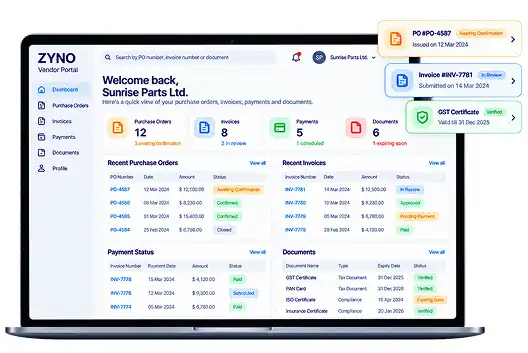
Your suppliers want four things: their purchase orders, their invoice status, their payment dates and a clear list of what you need from them. ZYNO Vendor Portal puts all four in one secure place, so your team spends less time answering repeat questions and more time managing procurement.
 ★★★★★
 ★★★★★
 ★★★★★
 ★★★★★
Every “Quick Update?” Email Costs More Than It Looks
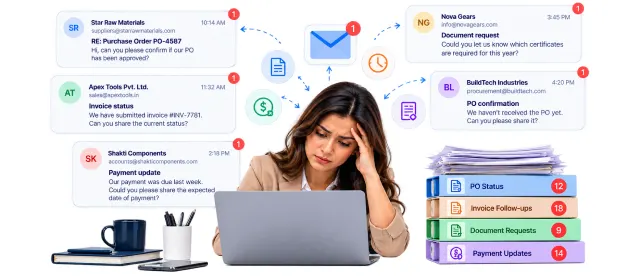
When supplier communication lives in inboxes, three things happen quietly:
Your team becomes a help desk.
PO status, invoice status, “did you get my certificate?” Same questions, one thread at a time, every week.
Suppliers work blind.
They cannot see what is confirmed, what is stuck or what you need next, so they ask again.
Documents surface at the worst moment.
Certificates and tax forms scattered across inboxes turn up late, or not at all, when an audit asks.
A vendor portal gives suppliers a central place to check available information and complete supported tasks, reducing the need to chase updates across separate email threads.
What Is Vendor Portal Software?
Vendor portal software is a secure, self-service workspace where suppliers register, view purchase orders, submit invoices, check payment status and share compliance documents with the company that buys from them, without email back-and-forth. “Vendor portal” and “supplier portal” mean the same thing.
ZYNO Vendor Portal is the supplier-facing part of ZYNO Procurement software. It is built for businesses that buy from many suppliers and want those suppliers to self-serve. For a neutral overview of how supplier portals typically work, see Microsoft's supplier portal documentation.
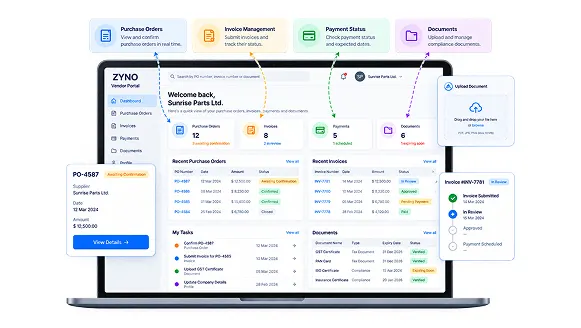
Looking to log in to a specific company's vendor portal? Use the link that company sent you. This page is for businesses that want to run their own.
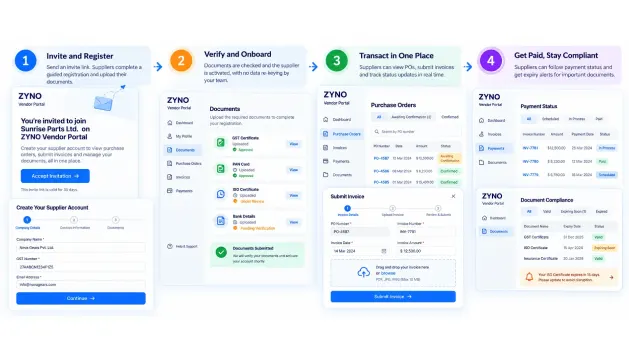
How ZYNO Vendor Portal Works: Four Steps
-
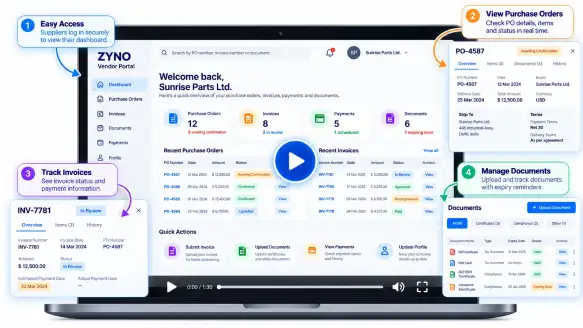
Invite and register.Send an invite link. Suppliers complete a guided registration and upload their documents themselves.
-
Verify and onboard.Documents are checked and the supplier is activated, with no data re-keying by your team.
-
Transact in one place.POs, invoices and status updates move through the portal, so suppliers see changes as they happen.
-
Get paid, stay compliant.Suppliers follow payment status; expiry alerts flag documents before they lapse.
Everything Suppliers Ask You For, Already Answered
Self-service registration
Suppliers enter their own details and documents. Your team stops chasing onboarding paperwork by email.
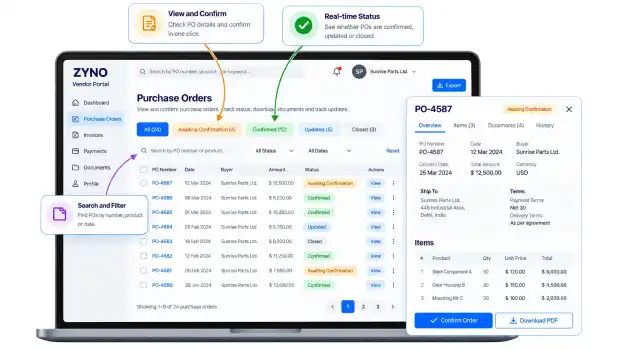
Live purchase order status
Suppliers see which POs are issued, awaiting confirmation or updated. Your team stops answering “has my PO been approved?”
Invoice submission and tracking
Suppliers submit invoices and follow their status. Your team stops fielding invoice status follow-ups.
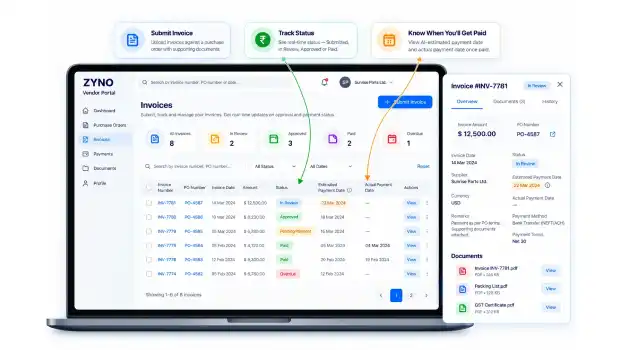
Payment visibility
Suppliers see payment status, plus AI-estimated payment dates clearly labelled as estimates, not commitments. Fewer “when will we be paid?” messages.
One document hub
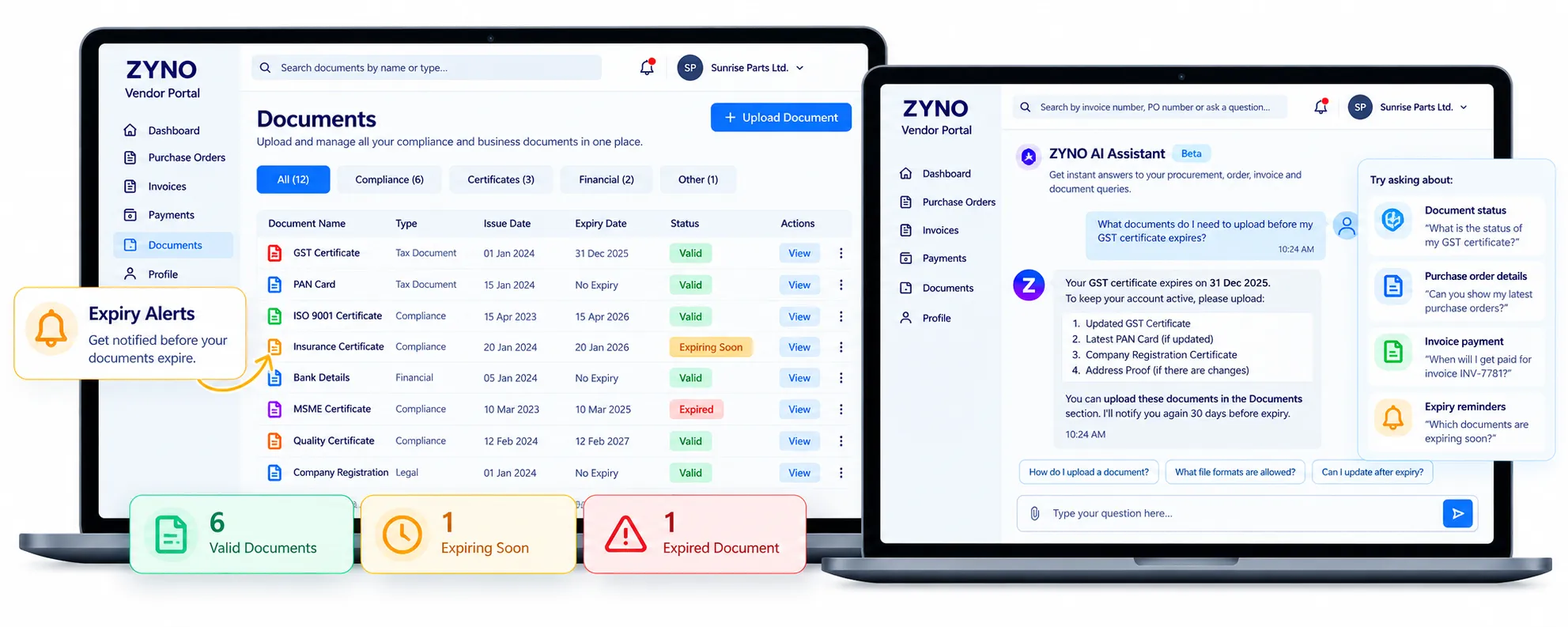
Contracts, certificates and tax forms live in one place, with alerts before documents expire. You stop re-requesting the same certificate.
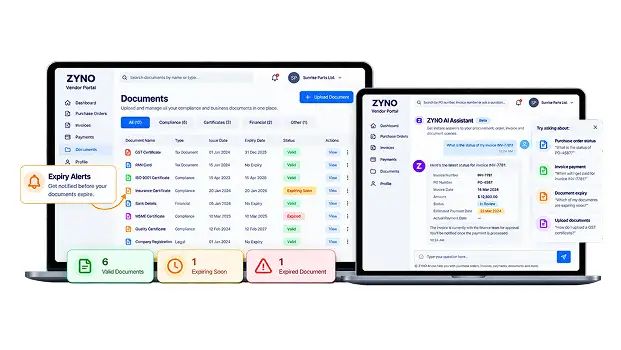
AI query assistant and notifications
Routine questions about PO status, invoice timelines and document requirements get answered inside the portal, and alerts flag approvals, rejections and payment milestones. Fewer routine questions reach your inbox.
Vendor Portal vs Vendor Management Software: Which Do You Need?
Vendor Portal software helps suppliers work with your business. Vendor Management software helps your team manage those suppliers. The two capabilities solve related but different problems, and some procurement platforms provide both.
| Area | Vendor Portal Software | Vendor Management Software |
|---|---|---|
| Primary users | Suppliers and teams coordinating supplier-facing tasks | Procurement teams and stakeholders responsible for supplier oversight |
| Main purpose | Give suppliers a place to access procurement information and complete supported tasks | Manage supplier records, qualification, risk, compliance and performance |
| Purchase orders and invoices | Supplier-facing access to supported PO and invoice information | Internal oversight of supplier information and the wider supplier relationship |
| Onboarding | Suppliers submit required details and documents | Internal teams review, qualify and approve suppliers where supported |
| Risk and compliance | Suppliers provide requested documents or information | Internal teams assess supplier risk and monitor compliance requirements |
| Key question | Can suppliers find the information they need and complete their tasks? | Can our team effectively evaluate, govern and manage our suppliers? |
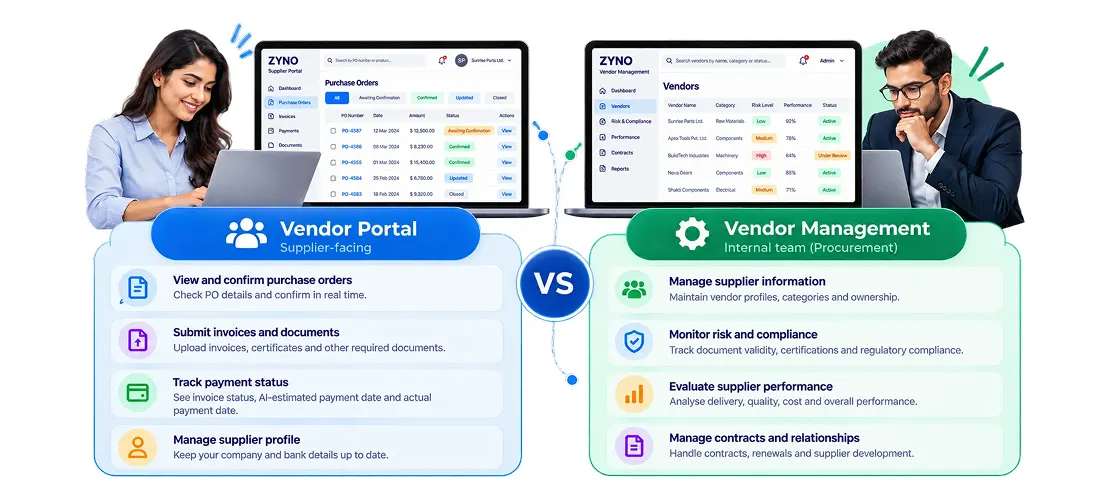
Vendor PortalChoose Vendor Portal when your priority is supplier self-service and easier access to PO, invoice, payment and document information.
Vendor ManagementChoose Vendor Management when your priority is supplier records, qualification, risk, compliance and performance oversight.
If you need both, evaluate how the two capabilities work together in your procurement process.
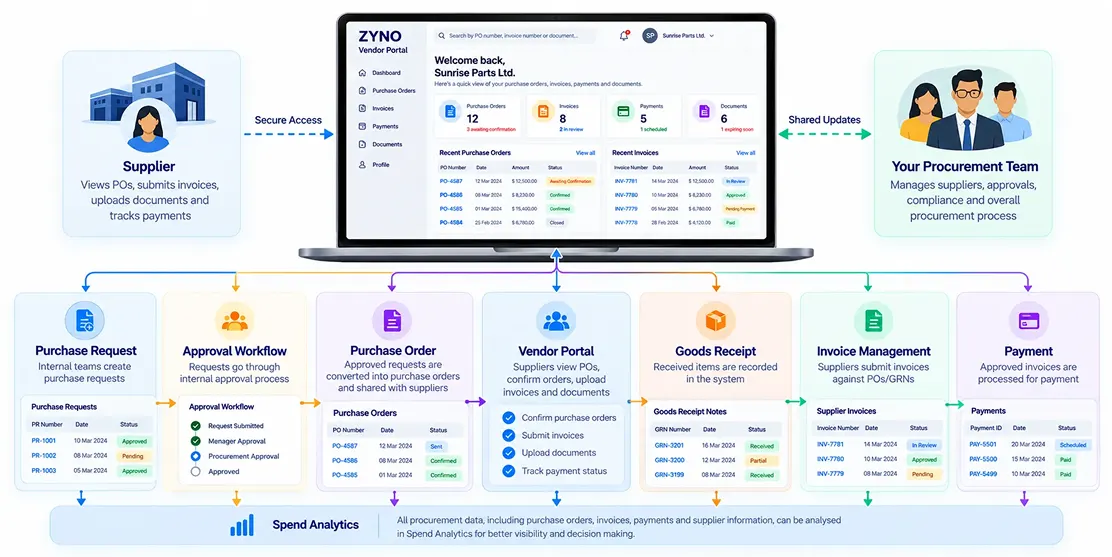
Connect Supplier Interactions With Your Procurement Process
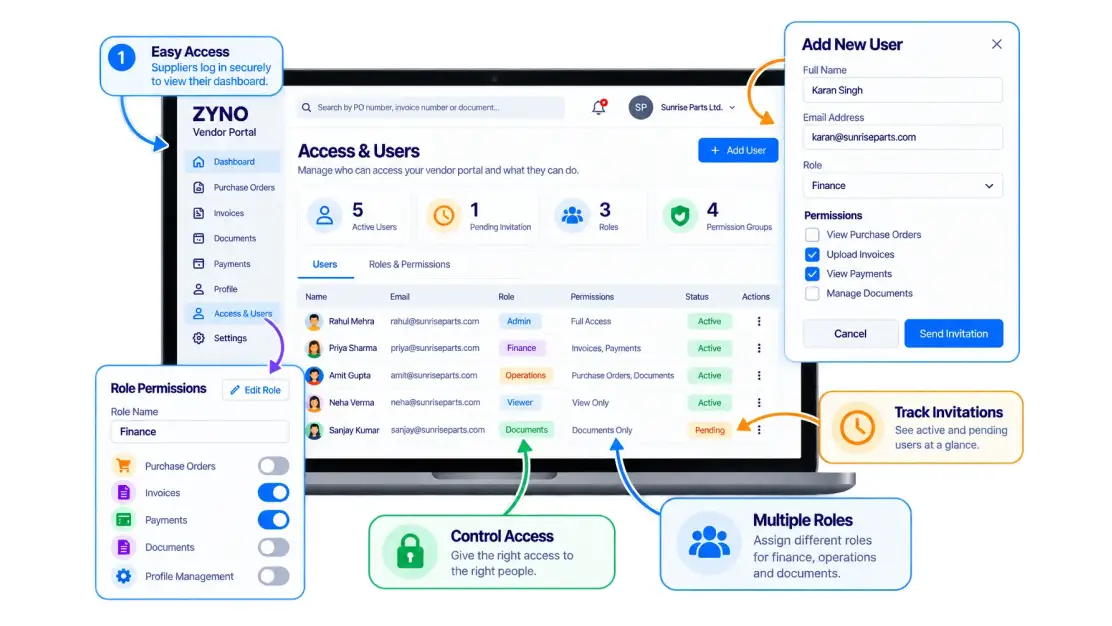
The portal is the supplier's door into the rest of your purchasing process. It connects with Procure-to-Pay, Accounts Payable, Contract Management, Quotation Management and RFP Management. Access is role-based, so each supplier sees only its own records.
“Will Our Suppliers Actually Use It?” The Right Question to Ask Before You Buy
A portal only saves time if suppliers use it. Adoption usually fails at registration: too many fields, unclear steps, a login nobody remembers.
That is why ZYNO starts with the supplier's side: an invite link, a guided registration and a dashboard that answers their questions at a glance. In your demo, we show you the supplier's screen first, so you can judge whether your suppliers would really use it.
Six Questions to Ask Any Vendor Portal Provider
- Which supplier tasks does it support: POs, invoices, payments, documents and onboarding?
- How do suppliers access the portal, what information can they see, and what security controls protect their data?
- Can I see the supplier experience, not just the admin view?
- How does it connect with our ERP, finance and procurement processes?
- What does the AI handle, and what requires human review?
- What does implementation involve, and what support is available for supplier onboarding?
We are happy to answer all six in a demo.
Frequently Asked Questions About Vendor Portal Software
What is vendor portal software?
A secure, self-service workspace where suppliers register, view purchase orders, submit invoices, track payments and share documents with a buyer, replacing email back-and-forth with one shared view.
What is the difference between a vendor portal and a supplier portal?
Nothing in practice. Both terms describe the same supplier-facing workspace. ZYNO uses them interchangeably.
What can suppliers do in ZYNO Vendor Portal?
Register and upload documents, view PO status, submit and track invoices, see payment status and estimated payment dates, receive alerts and ask the AI assistant routine questions.
Can suppliers see when they will be paid?
They can see payment status and AI-estimated dates based on historical processing patterns. Estimates are guidance, not guaranteed payment dates.
How is a vendor portal different from vendor management software?
A portal is the supplier's self-service view. Vendor management is your team's internal record of suppliers, risk, compliance and performance. ZYNO offers both and connects them. Explore Vendor Management.
What is a vendor fulfillment portal?
In procurement, it means suppliers coordinate order-related activity after a PO is issued. The term is also used for dropship and marketplace seller portals, which are a different category. ZYNO Vendor Portal is built for procurement teams working with their suppliers, not for marketplaces.
Does the vendor portal connect to other procurement modules?
Yes. It works with Procure-to-Pay, Accounts Payable, Contract Management, Quotation Management and RFP.
Is supplier data secure?
Access is role-based, so suppliers see only their own records.
How do I know if ZYNO Vendor Portal is right for us?
If your team answers the same supplier questions weekly (PO status, invoice status, missing documents), a portal pays for itself in time. Book a demo and bring your own PO and invoice flow.
How much does it cost?
Pricing depends on the modules and the supplier volume you need. See ZYNO Procurement pricing or ask for a quote in your demo.
See Your Suppliers' Side of the Portal Before You Decide
Book a demo and we'll walk through your own purchase order and invoice flow, starting with the screen your suppliers would use.

ZYNO Digital fuels smarter digital growth through data-driven marketing, creative storytelling, and performance strategies that boost visibility, engagement, and measurable business outcomes across global platforms.

ZYNO Tech delivers cutting-edge IT solutions — including web, mobile, and digital transformation services — helping businesses scale efficiently, innovate faster, and stay ahead in a connected world.

ZYNO AI harnesses the power of artificial intelligence to automate processes, enhance decision-making, and deliver predictive insights — driving innovation, agility, and measurable business growth.

ZYNO by Elite Mindz offers AI-powered products and services that unify operations, boost productivity, and drive digital transformation — helping businesses scale smarter and innovate faster.
Tell us what you need, and we'll get back with cost & timeline
* In just 2 mins you'll get a response
* Your idea is 100% protected by our Non-Disclosure Agreement
ZYNO Procurement
To Support Your Every Procurement Needs
With 15+ years of expertise, 300+ professional developers, and trusted by 1000+ businesses ZYNO Procurement offers top-notch procurement app to enhance your business’s productivity and security.
Trusted by leading companies worldwide









Get In Touch With Our IT Experts
Complete the form and discuss procurement strategies with our experts.