Contact Us




Requests arrive in different formats
Details come through emails, chats, or other formats, so procurement may need to chase missing information.
 ×
×

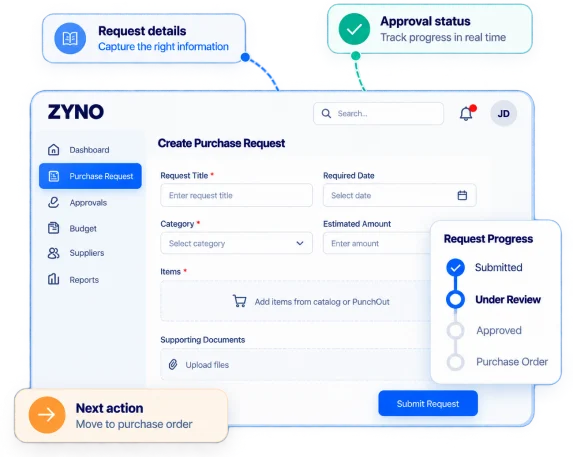
Give employees a clear way to request what they need and give procurement teams a more structured way to review, approve, and track each purchase. ZYNO helps you manage purchase requests with configurable forms, approval workflows, budget checks, guided item selection, and a connected path toward purchase order creation.
See how a request moves from submission to approval and purchasing.
 Accenture
 Citibank
 HealthKart
 Hockey India
 Larsen &
Toubro
Larsen &
Toubro Lenskart
 MapmyIndia
 PwC
PwC Sony
Sony PVR
PVRPurchase requisition software, also called purchase request software, helps a business manage internal requests to buy goods or services. Employees submit the details of what they need, designated reviewers assess the request, and approved requisitions move forward through the organization’s purchasing process.
ZYNO Procurement provides purchase requisition management software that connects request creation, configured approvals, budget information, and request tracking in one workflow.
With ZYNO, your team can:
The everyday challenge
A request might start in an email, get clarified in a chat, wait for approval, and then be re-entered into another system. The challenge is knowing what information is missing, who needs to act, whether the request fits the budget, and what happens after approval. ZYNO helps bring these steps into a more consistent purchase requisition workflow.
Details come through emails, chats, or other formats, so procurement may need to chase missing information.
Forms give employees a consistent way to provide the details your process requires.
Reviewers may need additional details or supporting documents before they can decide.
Request-level information and collaboration help participants review relevant details together.
Employees may not know where a request stands and may follow up for updates.
Relevant users can check submitted request progress and identify pending actions.
Approvers may need to switch tools or ask procurement for budget context.
Budget visibility and configured checks are available within the purchase request process.
Approval may not make it clear how the requisition moves forward in purchasing.
The configured workflow helps the team continue from an approved requisition toward purchase order creation.
How It Works
A clear purchase requisition workflow shows requesters what to submit, approvers what to review, and what happens after a decision. ZYNO supports these five stages through your configured process.
Employees use a configured request form to enter required purchasing details and provide the information their organization needs for review before submission.
Requesters add needed goods or services, include relevant details and documents, and select available catalog items or supported PunchOut options when enabled.
The requisition enters the configured purchase requisition approval workflow, with routing conditions such as request amount, category, or department, based on setup.
Approvers review the request and available budget context; requesters and relevant team members track status and use supported notifications and collaboration features.
After approval, the requisition moves toward purchase order creation through the configured process; the exact handoff depends on your organization’s configured workflow.
Built around the request journey
Whether you are standardizing employee requests or improving procurement approvals, your system should support the request from submission through the next purchasing step.
Core purchase request features
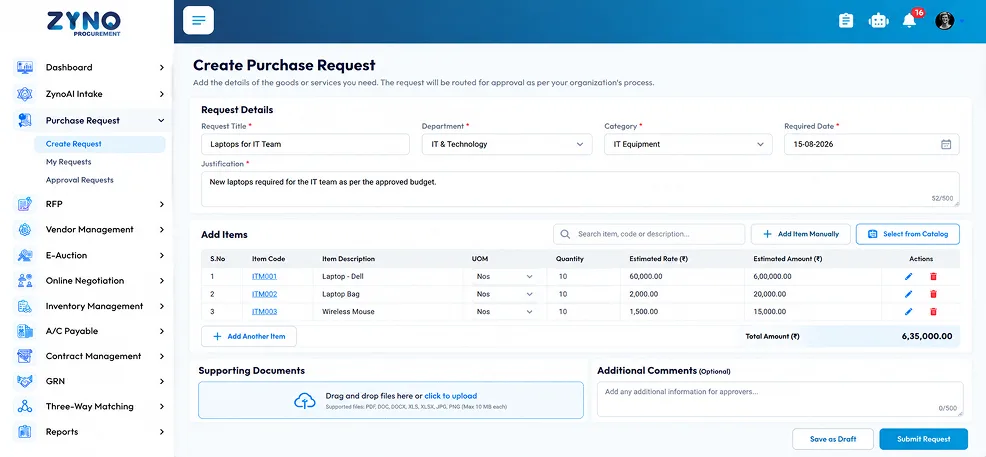
Give employees one clear way to submit a purchase request, using forms set up to collect the details your organization needs.
Employees can:
Consistent request details help reviewers focus on the decision instead of chasing basic information.
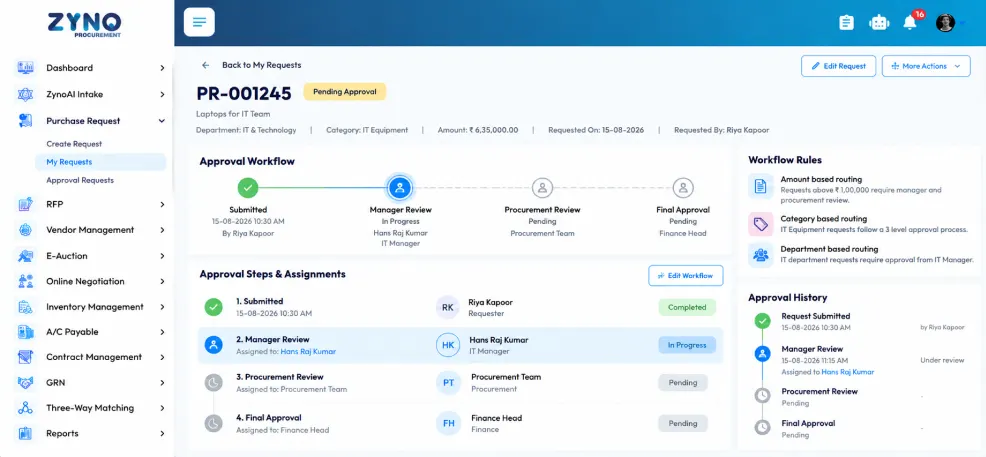
Set up a purchase requisition approval workflow that reflects your organization’s review steps and responsibilities.
Your team can:
A defined approval process helps employees and reviewers understand who needs to act and when.
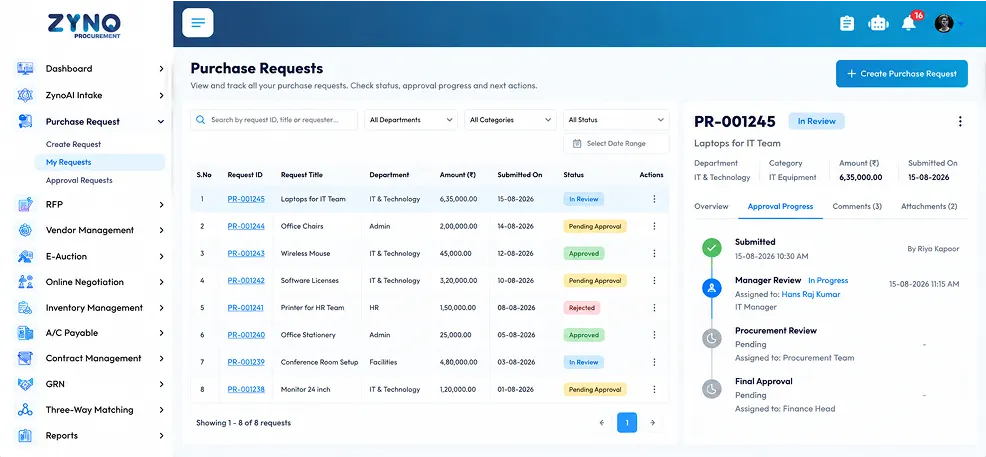
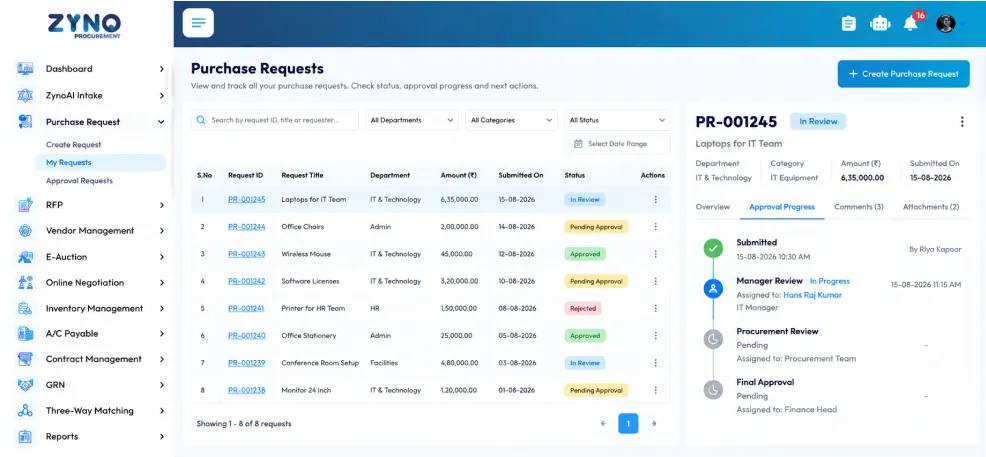
Use purchase request tracking software to check a request’s current stage and see whether an action is pending.
Relevant users can:
Requesters can check progress, while procurement can monitor activity without relying only on separate follow-up conversations.
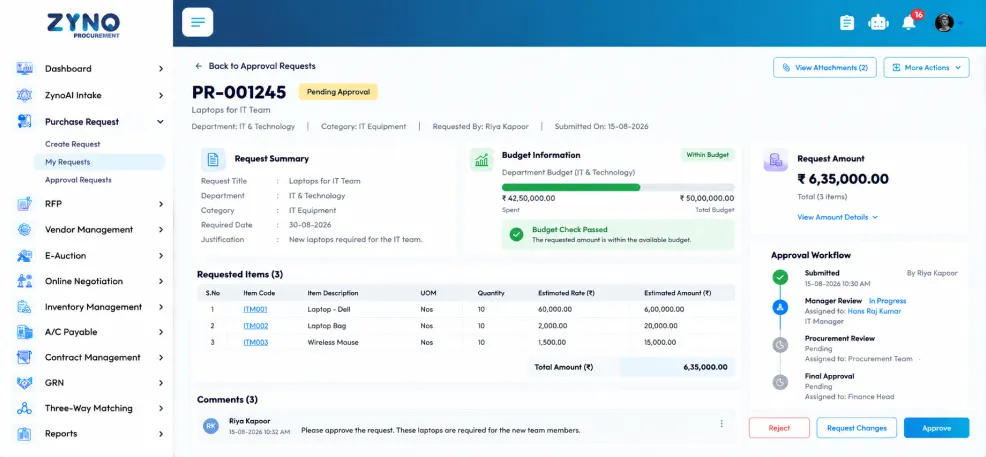
Give approvers budget context while they review a purchase request, with visibility and checks configured for your process.
During review, your team can:
Having budget context alongside the request helps reviewers consider financial information as part of their decision.
Help employees choose goods or services through the purchasing options your organization makes available in ZYNO.
Where enabled, employees can:
Guided item selection helps employees use the purchasing channels set up by their organization.
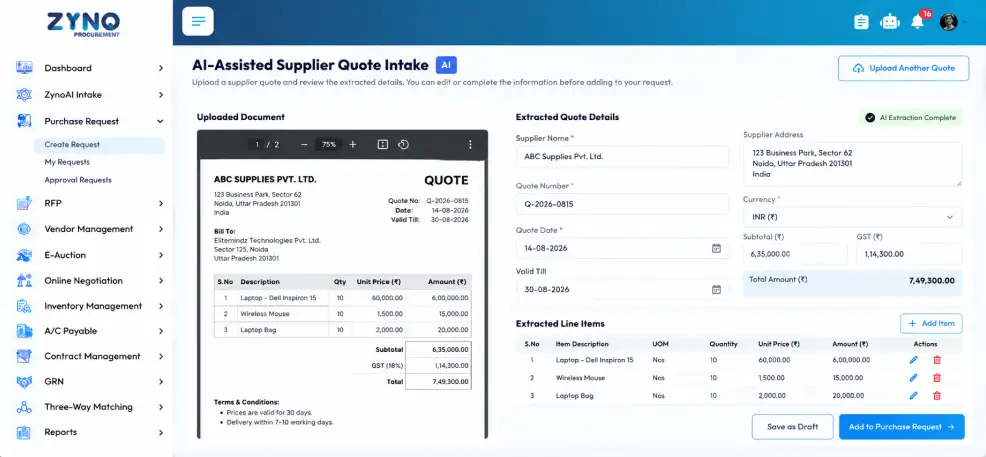
Use AI-assisted quote intake to prepare supported supplier quote details for review, while keeping users involved in checking the information.
The user-led process includes:
AI assistance can reduce repetitive entry of supported quote details while allowing users to check the information before proceeding.
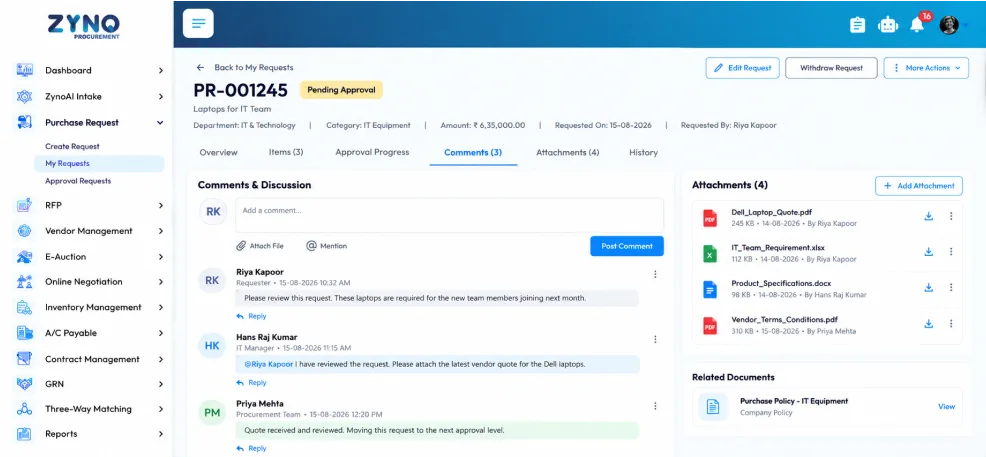
Keep supported comments, documents, and request-related discussions connected to the requisition record.
Depending on your setup, users can:
Keeping communication with the request makes relevant context easier for participants to find.
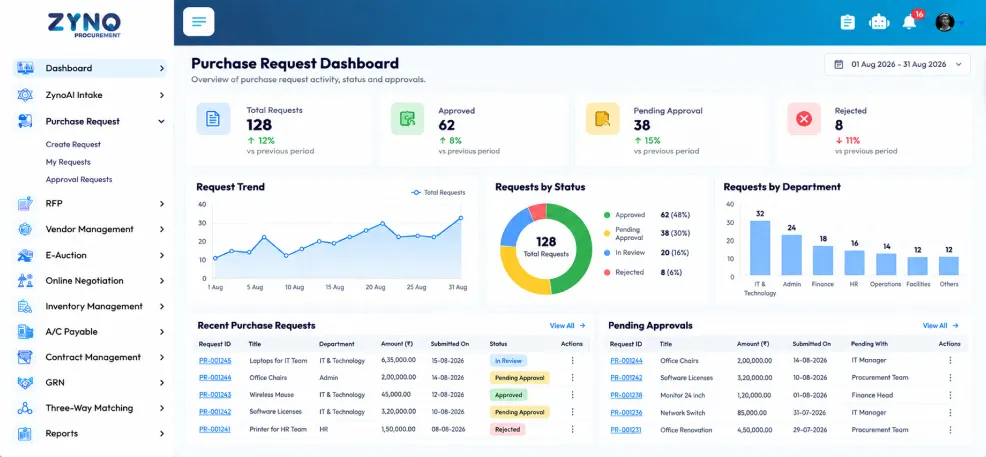
Use available reports and dashboards to review purchase request activity and monitor progress across your workflow.
Procurement teams can:
A view across requests helps teams monitor workflow activity without opening each requisition individually.
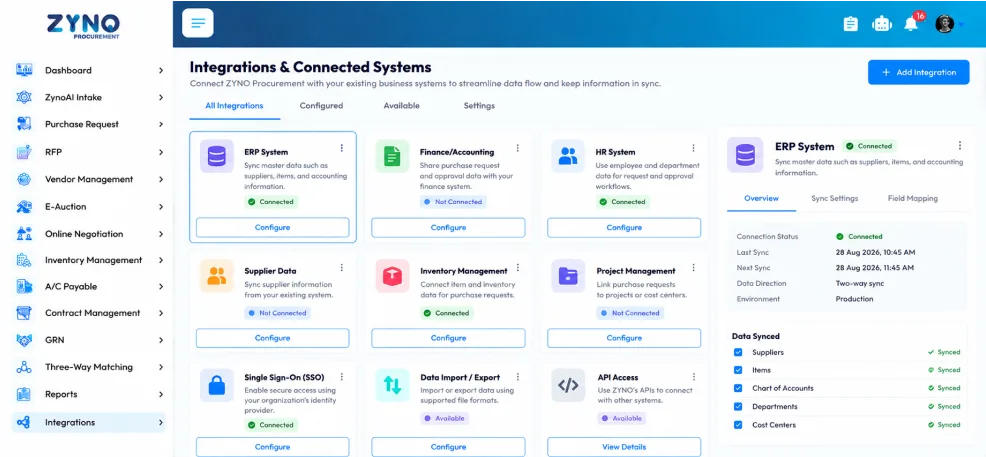
Explore how ZYNO’s supported integrations may connect the purchase request process with your organization’s existing business systems.
During a demo, your team can:
Reviewing integration options helps your team understand how the purchase request process may work alongside existing systems.
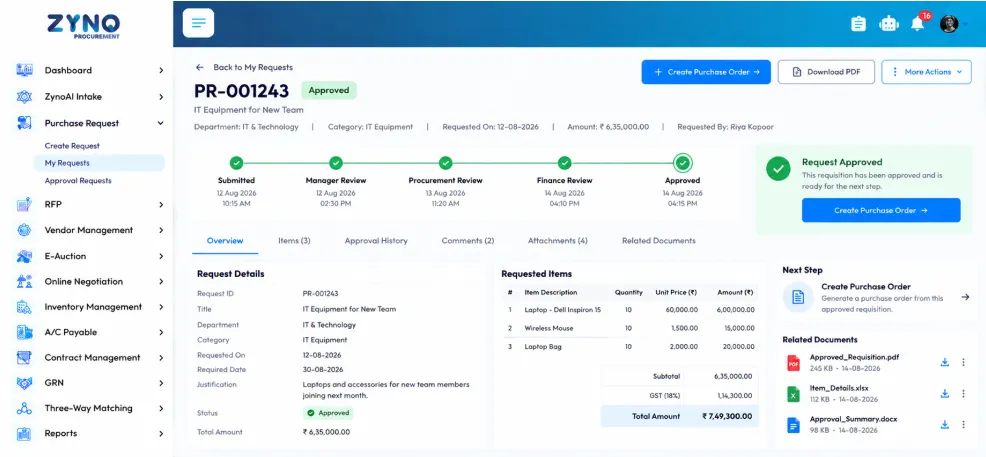
Help your team continue an approved requisition toward purchase order creation through the configured purchasing process.
Depending on your workflow, the process can:
A clear next step helps the team understand how an approved request continues through purchasing.
Approvals and Control
Approval workflows are only useful when they match the way your organization makes purchasing decisions. ZYNO supports configurable routing so requests can be reviewed by the relevant people under your organization’s rules.
Configure approval routing using supported conditions such as request amount, category, and department. Set the appropriate approval steps and approver assignments for your process.
Use supported notifications to help relevant users follow request activity and identify when they need to act. The notification behavior follows the configured workflow.
ZYNO supports escalation options as part of the configured approval process. Set the available escalation behavior to reflect your organization’s follow-up requirements.
Use available approval history to review actions taken during the requisition workflow. This can help authorized users understand how a request progressed through its configured review stages.
Example workflow paths. Your routing depends on your configuration.
Budget Context
A purchase request should be considered alongside the relevant financial information. ZYNO supports budget visibility and configured checks within the requisition process, helping approvers review the request in the context of your organization’s purchasing controls.
| Check Type | Department Budget |
|---|---|
| Rule | Request amount must be within available budget |
| Status | ✓ Passed |
| Checked By | System (Configured Rule) |
Show approvers the budget information available for a purchase request, when it is included in your configured workflow.
Use the budget checks supported in your setup during requisition review. The system’s response depends on your configured rules.
Keep request details and budget context together so approvers can review the information before deciding how to proceed.
After Approval
Approval is a decision in the purchasing process. The next step is to move the approved requisition toward purchase order creation through your organization’s configured workflow.
ZYNO supports this handoff so teams can continue from the approved request to the next purchasing stage. The exact process, including any review or action required before a purchase order is created, depends on your configuration.
Laptops for IT Team · IT & Technology · ₹ 6,35,000.00
| Supplier | ABC Traders |
|---|---|
| Total Amount | ₹ 6,35,000.00 |
| Approved On | 14-08-2026 04:15 PM |
| Approved By | Finance Head |
| Item | Qty | Unit (₹) | Amount (₹) |
|---|---|---|---|
| Laptop - Dell | 10 | 60,000.00 | 6,00,000.00 |
| Wireless Mouse | 10 | 1,500.00 | 15,000.00 |
| Laptop Bag | 10 | 2,000.00 | 20,000.00 |
Check which requisition details carry forward into the purchase order stage.
Identify who is responsible for creating or processing the purchase order.
Check whether review is needed before the purchase order moves forward.
Follow the request status as it moves through the purchasing handoff.
Work beyond the desk
Purchase requests and approvals do not always happen at a desk. ZYNO supports mobile experiences for request creation and approvals, allowing authorized users to take supported actions through mobile devices.
Employees can create and submit requests through the supported mobile workflow. Approvers can review and act on requests using the mobile approval experience available to them.
See how employees create and submit purchase requests using a mobile device.
Review which purchase request details employees can enter or check on mobile.
Then see how approvers review pending requests and take action using mobile.
Finally, check which request statuses and notifications users can view on mobile.
Designed around roles
Each role supports a different part of the purchase request process, from submitting and reviewing requests to coordinating purchasing activity and monitoring progress.

Employees submit purchase requests using configured forms, add the details needed for review, choose available purchasing options, and track submitted requests.
Approvers review submitted request details and available budget information, ask questions when needed, and decide through the organization’s configured approval process.
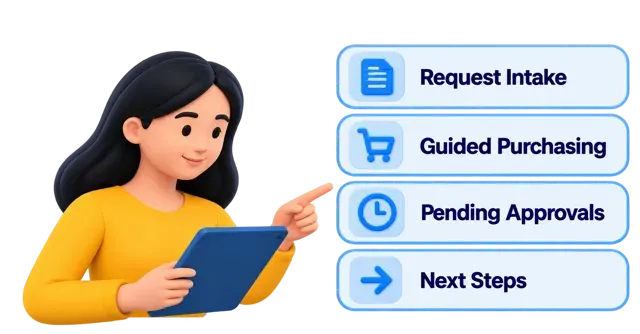
Across workflows, procurement teams manage request intake, monitor pending activity, support guided purchasing, and coordinate next steps in the purchasing process.

Procurement managers use available dashboards, reports, and approval history to review request activity, monitor workflow progress, and oversee the purchasing process.
The Buyer’s Checklist: 35+ Questions to Ask Before Buying Purchase Requisition Management Software.
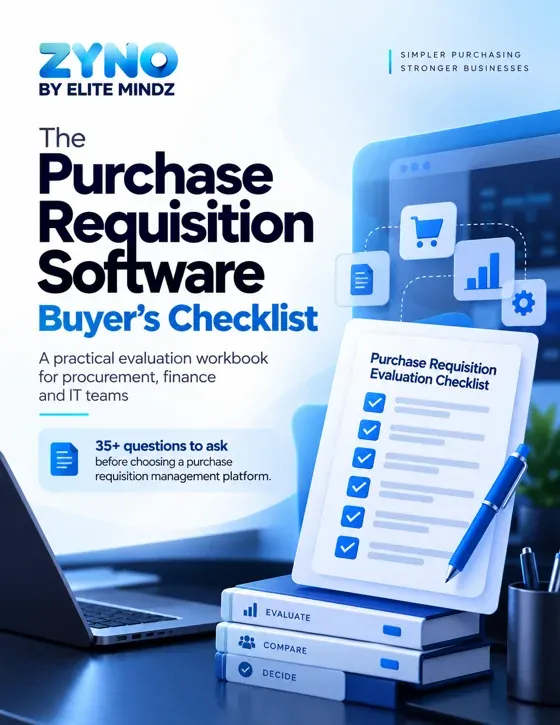
Enter your details to access the buyer’s checklist.
We’ve received your details.
Case studies
See how organizations have used ZYNO and related Elite Mindz solutions to address procurement and operational needs through connected workflows.
Hockey India
Hockey India used ZYNO to bring procurement and tendering activities into a more connected digital workflow.
EaseMyTrip
EaseMyTrip’s procurement environment included vendor management, purchase orders, quotations, and invoices.

PVR
PVR implemented an Electronic Register for purchase orders, GRNs, RFP tools, tender management, and approvals.
Customer voices
Hear how teams describe their experience with ZYNO across procurement visibility, workflow coordination, and operational control.
“ZYNO helped us get a clearer view of our purchase requests and made it easier to coordinate the process.”
“With ZYNO, we spend less time managing procurement steps and can focus more on the work that matters.”
“ZYNO gives our team better visibility into procurement activity and more control as our needs grow.”
“Having our procurement process connected in ZYNO has helped our team move requests forward more smoothly.”
“ZYNO helps us keep track of procurement activity across our markets and coordinate the process more easily.”
“ZYNO has helped us manage vendor and purchase information with greater visibility and control.”
Want to see how ZYNO could support your workflow?
Walk through a purchase request
scenario with our team.
Book a Demo
See how ZYNO can streamline purchasing, vendor management, approvals, quotations, procure-to-pay and spend visibility in one connected procurement platform.
Fill in your details and our team will get in touch.
Our team will get in touch shortly.
FAQ
Quick answers about purchase requisitions, approval workflows, budgets, mobile access, AI quote intake and what happens after approval.
Purchase requisition software helps organizations create, submit, review, approve and track internal requests to buy goods or services. It gives employees and purchasing teams a structured way to manage requests before the purchase moves to the next step.
Both terms commonly refer to an internal request to buy goods or services. Organizations may use them differently, so confirm your team’s terminology and the stages in its purchasing process.
A purchase requisition is an internal request for a planned purchase. A purchase order (PO) is the purchasing document issued to a supplier after the required internal review and approval.
An employee creates a request with the required details and submits it for review. The request follows the organization’s configured approval process. Relevant users review and track its status, and an approved request can move toward purchase order creation through the configured process.
A purchase requisition should include the details reviewers need to assess the purchase. These may include the goods or services required, quantity, department, business purpose, required date, budget-related information and supporting documents. Required fields depend on your organization’s purchasing rules.
Yes. ZYNO supports configurable approval routing based on supported conditions such as request amount, category and department. The exact workflow and approver assignments depend on your organization’s setup.
Yes. ZYNO provides request status visibility so relevant users can follow a requisition’s progress through the configured workflow.
Yes. ZYNO supports budget visibility and configured checks within the purchase request process. Available budget information and the behavior of each check depend on your configuration.
Yes. ZYNO supports mobile request creation and approval experiences through its supported mobile workflow. Available actions depend on the product experience and user permissions.
Yes. ZYNO supports AI-assisted quote intake for supported documents. It can extract supported information for user review. Users should verify the extracted details and make any needed corrections or additions before proceeding.
An approved requisition can move toward purchase order creation through the configured process. Whether a PO is created automatically or requires a further user action depends on your organization’s setup.
Book a personalized demo and walk through a real purchasing scenario. Review request creation, approval routing, status tracking, budget context and the post-approval handoff with the ZYNO team. You can also start a 14-day free trial to try the product.
Implementation and fit
Choosing purchase requisition software is not only about the feature list. Your team also needs to understand how the workflow will be configured, how employees will use it, and how it will fit alongside your current systems.
A personalized demo can help you review a realistic request from submission through approval and the next purchasing step.
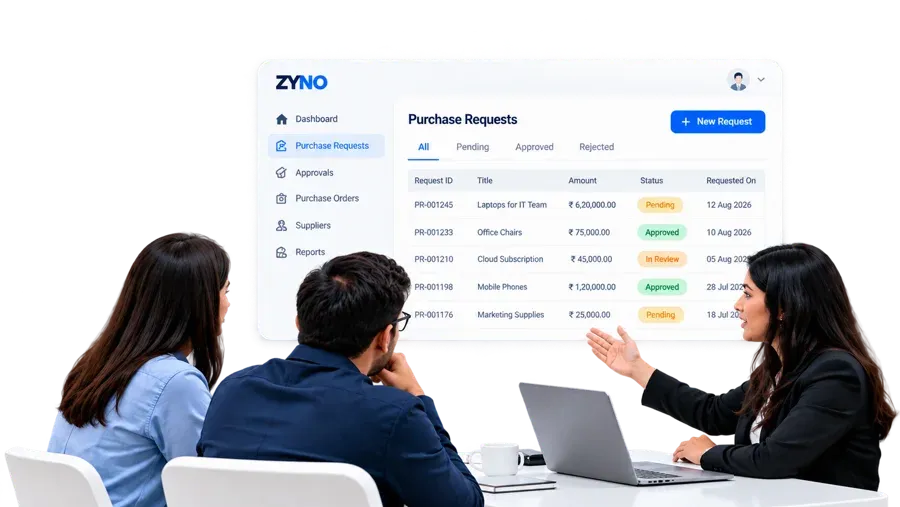
Choose a typical purchase your team handles, such as regular supplies or a department request, and use it to walk through the workflow.
Next, discuss what affects approval, who needs to review the request, and what follow-up or escalation steps your organization may need to confirm.
Then, share the business systems your team uses today, and ask which supported integrations may connect them to your purchasing workflow in ZYNO.
Finally, ask the ZYNO team how implementation is handled, who manages configuration, and what training and support options are available for your organization.
Make purchase requests easier to submit, review and track with ZYNO. See how your team can manage approvals with the right context and move approved requests toward the next purchasing step.
Book a personalized demo to walk through your real purchasing process and see how ZYNO can fit your organization’s needs.
Bring a real purchase scenario. We’ll walk through request creation, approval routing and the handoff toward purchase order creation in your configured workflow.

ZYNO Digital fuels smarter digital growth through data-driven marketing, creative storytelling, and performance strategies that boost visibility, engagement, and measurable business outcomes across global platforms.

ZYNO Tech delivers cutting-edge IT solutions — including web, mobile, and digital transformation services — helping businesses scale efficiently, innovate faster, and stay ahead in a connected world.

ZYNO AI harnesses the power of artificial intelligence to automate processes, enhance decision-making, and deliver predictive insights — driving innovation, agility, and measurable business growth.

ZYNO by Elite Mindz offers AI-powered products and services that unify operations, boost productivity, and drive digital transformation — helping businesses scale smarter and innovate faster.
* In just 2 mins you'll get a response
* Your idea is 100% protected by our Non-Disclosure Agreement
With 15+ years of expertise, 300+ professional developers, and trusted by 1000+ businesses ZYNO Procurement offers top-notch procurement app to enhance your business’s productivity and security.





Complete the form and discuss procurement strategies with our experts.