×
Track, manage, and optimize business expenses with smart expense tracking solutions. Learn how small businesses and growing companies can improve cash flow, reduce errors, and gain better financial control.
Month-end hits. You have a pile of receipts, half-done expense reports, and bank statements that don't match what your team actually spent. Sound familiar? That's exactly why expense tracking matters. Corporate cards, employee reimbursements, vendor payments, SaaS subscriptions, mileage — it all moves fast, and manual processes can't keep up.
This guide covers what Expense Tracking involves, the real benefits it delivers, how to pick the right software, and how to build a system that grows with you. Whether you run a 10-person startup or a 200-person firm, the fundamentals are the same.
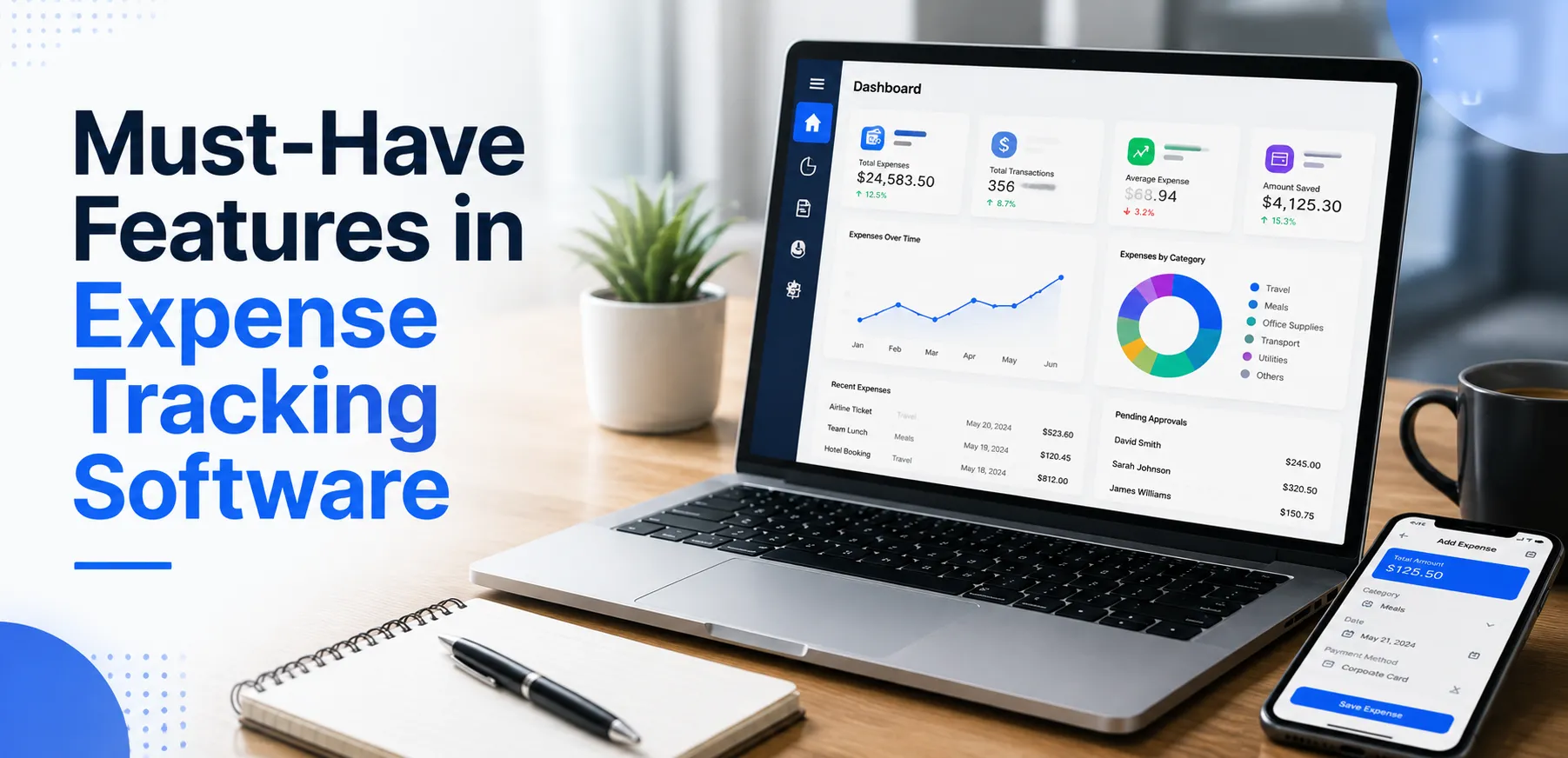
Boost financial control with smart Expense Tracking Software. Automate expense management, track spending, and improve business decisions.
A business Expense Tracker is a digital system that captures, categorizes, and reports every expense — across employees, corporate cards, reimbursements, and bank accounts — in one place. Think of it as the backbone of daily financial management. It keeps your books clean without the constant back-and-forth of chasing receipts.
In practice, expense tracking covers a lot of ground. That includes receipt scanning, expense submission, policy checks, approval workflows, reimbursement processing, and accounting sync. The goal is to keep every record audit-ready, without manual effort from your team.
Common ways companies use a business expense tracker:
• Track expenses from submission to approval, enforce spending policies, and help employees get reimbursed faster
• See spending patterns early, flag unusual business spending, and control costs before they quietly pile up
• Sync with accounting software to keep financial data consistent across systems
• Standardize expense categorization and maintain reliable financial records for tax filing
• Support independent contractors, remote teams, and global reimbursements without manual overhead
• Connect expenses to projects and clients for profitability analysis — not just company-wide buckets
Good expense tracking software turns expense management into a reliable, repeatable process. It's not a one-time admin fix. Whether you're a lean team tracking every dollar or a growing company building approval workflows, consistent systems are what help you scale without breaking.
Many companies put off Expense Management Software because things seem fine enough. But the real cost of delay — staff time wasted, errors in the books, missed tax deductions — usually stays hidden until a proper system is in place and you see the difference.
When expenses pass through a single workflow — submission, categorization, approval — the common failure modes disappear: duplicate entries, missing receipts, miscategorized transactions. Finance teams spend less time cleaning data at month-end and more time on analysis.
The most common complaint from employees: when do I get paid back? Clear approval workflows fix this. Employees can check claim status themselves, and finance teams stop answering the same question every week. Companies that implement these systems typically cut reimbursement cycles from 2-3 weeks down to 3-5 days.
Real-time spending data lets you spot problems early. You can see what's being spent by department, project, or category — before a budget overrun becomes a crisis. For small businesses with tight cash flow, this kind of visibility isn't optional. It's how you stay ahead.
Properly categorized and documented expenses mean higher legitimate tax deductions. When every expense has an attached receipt and category, your tax preparer works efficiently — and if you're ever audited, records are already complete and defensible.
When spending limits, approved vendors, and out-of-policy flags are built into the software, finance doesn't manually review every report. The system flags exceptions automatically — only edge cases need human attention.
If you run a client-facing business, linking expenses to projects isn't optional — it's core. Project-level expense tracking tells you which engagements are profitable, which are bleeding cost, and where to adjust pricing. This includes pass-through expenses that get billed back to clients, which require clean documentation to invoice accurately.
Manual expense processing — chasing approvals, re-entering data into accounting software, reconciling statements — is expensive in staff time. Automation reduces cognitive load on finance teams so they focus on higher-value work.
The process that works for 10 people should still work for 100. Choose the right system now and you avoid a messy migration later — when you're too busy and the stakes are higher.

Not every expense tracker is built for real-world workflows. Here's what separates a basic tool from robust expense management software you can trust as your company scales:
Expense categorization needs to sync with your accounting software's chart of accounts, follow consistent rules, and produce reports that are actually useful. Inconsistent categories waste your finance team's time every single month.
Real approval workflows are rarely simple. You need manager sign-off, project-based approvals, and CFO review for big-ticket items. Look for configurable approval chains, backup approvers, escalation paths, and automatic routing for out-of-policy expenses — all without creating bottlenecks.
The Best Expense Trackers don't treat expenses as a separate admin task. Expenses should connect directly to the work that drives them — projects, clients, phases, cost centers. This gives finance a clear picture of profitability and budget impact without digging through spreadsheets. It also makes forecasting more accurate because planned vs. actual spend is visible in one place.
Reporting shouldn't wait until month-end. Real-time dashboards let you catch problems early, monitor budget burn, and make informed cash flow decisions on the spot. Look for drill-down capability — top-line numbers are only useful if you can trace them to individual transactions.
Employees submit expenses when it's convenient — usually right after the transaction, on their phone. Mobile-first receipt scanning with OCR to auto-populate fields reduces missed receipts and speeds up submission. If the mobile experience is clunky, compliance suffers.
Expense platforms hold sensitive data: corporate card details, bank accounts, vendor information. Multi-factor authentication, role-based access controls, and clear permission settings are basic requirements. If you operate in a regulated industry, verify SOC 2 compliance before signing up.
For agencies, consultancies, law firms, and any project-driven business, tagging expenses to specific projects or clients is non-negotiable. It enables accurate client billing, profitability analysis by engagement, and early warning when a project goes over budget. It also creates clean documentation for pass-through expenses you need to bill back.
Many growing companies use independent contractors alongside full-time employees. Your expense tracking software should handle contractor reimbursement workflows cleanly — not treat them as an edge case. Remote teams need mobile-first submission that works regardless of location.
Native integrations with QuickBooks Online, Xero, Sage, or NetSuite are foundational — not a nice-to-have. Verify the integration is real-time (not batch), maps categories correctly, and handles your close process. As companies scale, expense data also needs to connect to ERP platforms for financial consolidation and HRIS systems for employee data.
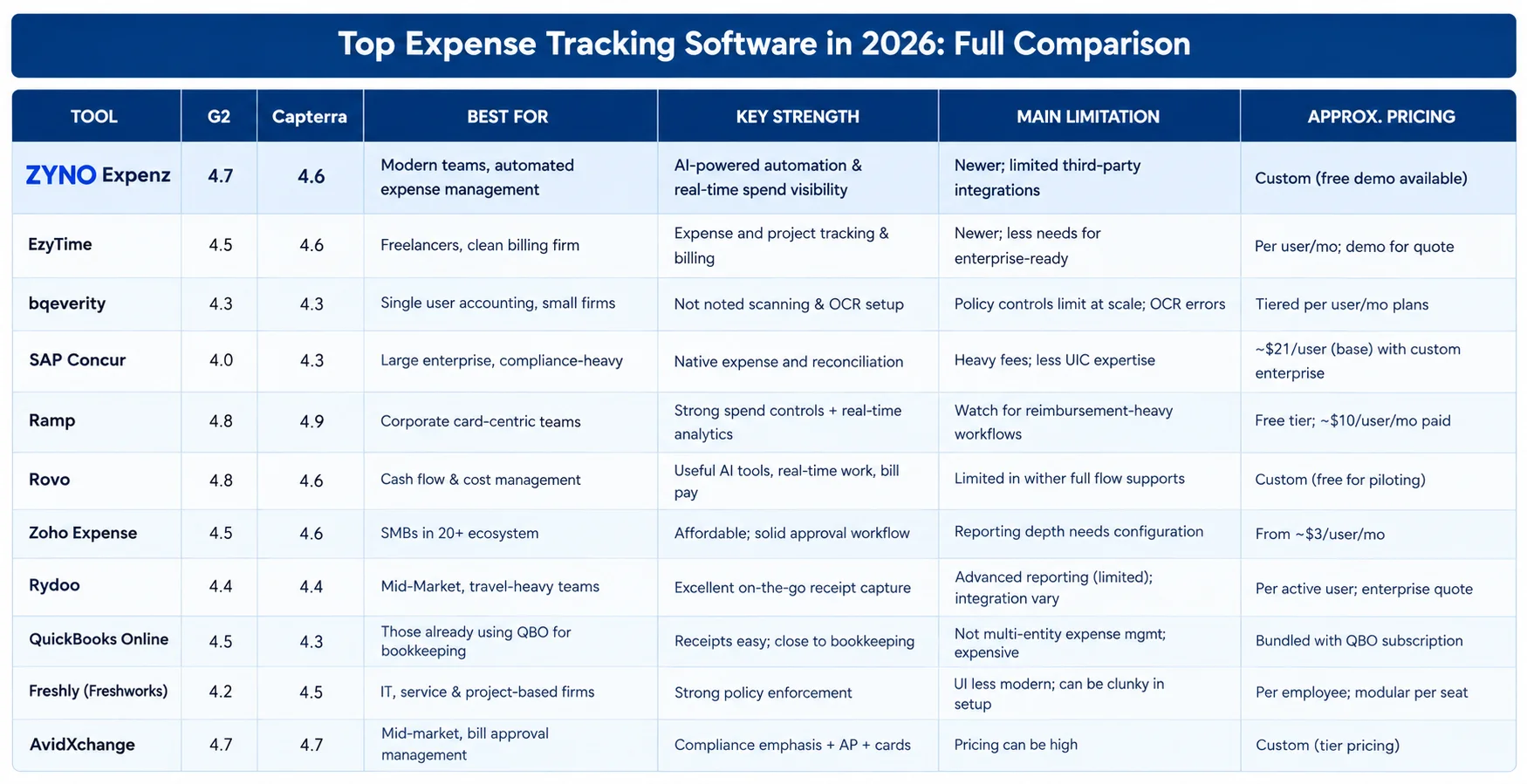
The market has matured significantly. Below is a comprehensive comparison — with G2/Capterra ratings, strengths, limitations, and pricing — to help you shortlist the right tool.

Before you compare tools, get clear on your own situation first:
1. Where do expenses originate? Corporate cards only, employee reimbursements only, or both? If primarily card-based, Ramp or Brex may be sufficient. Mixed workflows — including independent contractors — need dedicated expense management software.
2. How much control does your finance team need? Simple tools fall short when strict policy enforcement is required. Map your actual approval scenarios before evaluating tools.
3. Are expenses connected to projects or clients? If yes, project-level expense tracking isn't optional. Tools like BigTime lead here — especially when pass-through expenses need to be billed back to clients.
4. What accounting software are you using? Integration must be clean and native — not workaround-based. Verify the integration maps categories correctly and handles your close process before committing.
5. How fast is your company growing? The tool that fits today should still fit in 24 months. Check pricing tiers at higher user counts before signing.
6. Do you have international operations or distributed teams? Multi-currency support, VAT handling, and country-specific compliance aren't offered uniformly. Test international scenarios explicitly if your team is distributed.
7. What does implementation realistically look like? Factor in setup time, training, and change management — not just the subscription cost. Underestimating this is the most common adoption failure.
policies create chaos at month-end. Set a firm weekly deadline — Friday works well — so finance can start review on Monday. Put it in writing. It should be policy, not a suggestion.
Monthly review creates a rushed, error-prone close process. Weekly review spreads the work out, catches problems while context is still fresh, and removes the end-of-month crunch. Most well-run finance teams do this already. Smaller companies are often the last to adopt it.
Your expense policy needs to be written down, easy to find, and actually shared with your team. Employees need to know the rules: travel per diems, meal limits, approved vendors, what counts as a personal expense, and what documentation is required. This applies to contractors too. The software can only enforce what people know about.
Finance needs categories that map to the chart of accounts. Operations needs categories that map to projects and departments. Build the structure together. One expense submission should work for both teams without rework.
Monthly corporate card reconciliation packs too much work into too little time. Reconcile weekly. It distributes the workload evenly and surfaces discrepancies while the transactions are still recent enough to remember.
Set weekly spend alerts by department and project. If a team burns through 80% of its monthly budget in week one, you need to know on Day 7 — not Day 31 when it's already a problem.
Every approved and rejected expense should have a documented reason. Not just for external audits — for internal accountability and dispute resolution too. Clean documentation turns a 5-minute investigation into a 5-second lookup.
Contractors often run through different approval paths, have different tax documentation requirements, and different reimbursement timelines. These distinctions need to be built into your expense policy explicitly. Confirm your software can route contractor submissions correctly before you go live.
Most companies start with spreadsheets or a basic app. That's fine at first. But there's a clear point where it stops working:
• More than 3–4 people submitting expenses regularly
• Approval tracking via Slack or email becomes unreliable
• Month-end reconciliation takes more than two full business days
• You need financial records quickly for an auditor, investor, or acquirer
• Expense errors are appearing in client invoices or project budgets
• Independent contractors and remote employees are creating process inconsistencies
The right time to switch is at 10-20 employees, not 50. At 50, the migration is disruptive and you're already carrying a backlog of messy financial records.
Quick check: time your current expense process through one full cycle — submission, approval, reconciliation. That total is your baseline. It shows you exactly where automation pays off.
Many finance teams assume that issuing corporate cards means expense tracking is covered. It's not. Cards solve part of the problem — not all of it.
What a corporate card transaction gives you: amount, date, merchant name.
What expense management requires: business purpose, project code, receipt image, expense category, policy compliance check, manager approval, and — for client-facing teams — a billable flag for pass-through expenses.
That gap is what expense management software fills. It doesn't matter how the expense arrived — corporate card, reimbursement, contractor invoice, or personal card. It all needs the same process.
| Capability | Corporate Card Alone | With Expense Management Software |
|---|---|---|
| Transaction Capture | Yes (card transactions only) | Yes (all expense types incl. contractors) |
| Receipt Attachment | No | Yes — mobile capture + OCR |
| Expense Categorization | Basic merchant codes only | Custom categories, accounting-linked |
| Approval Workflow | No | Configurable multi-level |
| Policy Enforcement | No | Automated, real-time flagging |
| Project/Client Tracking | No | Yes (in project-capable tools) |
| Pass-through / Billable Expenses | No | Yes (with proper documentation) |
| Reimbursement Handling | Not applicable | Full workflow |
| Accounting Integration | Limited | Full, bi-directional sync |
| Contractor Expense Support | No | Yes (with policy-based routing) |
Any company with remote employees, international travel, or overseas operations needs to evaluate multi-currency capabilities explicitly — not assume they're included.
Key requirements for international expense management:
• Automatic currency conversion at the transaction date exchange rate
• Support for VAT/GST reclaim workflows by country
• Country-specific per diem rates and compliance rules
• Reporting in home currency with full transaction-level detail in original currency
• Tax jurisdiction tracking for compliance across multiple countries
• Mobile-first submission that works for employees regardless of location or time zone
Not all tools handle this equally. Rydoo and SAP Concur have stronger international coverage. Ramp and Brex are primarily US-focused. Test international scenarios explicitly before committing.
Read must : What Is Spend Management? Definition, Process, Strategies & Best Practices
Pick one expense tracker and make it the only system for expenses, receipts, and approvals. Connect your bank accounts and corporate cards so transactions are captured automatically. Require everyone — employees and contractors — to submit through the same workflow. Set clear category rules. Review expense reports weekly, not monthly, so issues get caught while they're fresh. This consistency also maximizes tax deductions because your documentation is always organized.
Bookkeeping covers all financial transactions in your business. Expense tracking is a specific part of that — focused on outgoing business expenses, their approval, categorization, and reporting. Good expense tracking makes bookkeeping more accurate. It doesn't replace your accountant.
If you have more than 5 people submitting expenses, dedicated software saves time and cuts errors — even at small scale. The question isn't really whether you need it. It's when manual tracking stops being worth the hassle. For most teams, that point hits around 10 employees.
It depends on your workflow. For project-driven, client-facing teams, BigTime stands out because it ties expenses directly to project budgets and client billing. For straightforward reimbursements, Expensify or Zoho Expense get the job done. For card-first spend control, Ramp is hard to beat. For large enterprise compliance, SAP Concur is reliable despite its dated interface. For full spend management in mid-market companies, Airbase gets the highest user ratings. There's no single right answer. Match the tool to how your team actually works.
Most tools charge per user per month, typically $5 to $30 depending on the plan. Enterprise platforms like SAP Concur, Airbase, and Brex are priced by quote. QuickBooks Online includes basic receipt capture in its existing subscription at no extra cost. Free trials are standard — most run 14 to 30 days. Write down your requirements before booking a demo so you know what to test.
Yes, it should — and this is one of the most important things to verify. Native integrations with QuickBooks Online, Xero, Sage, and NetSuite are standard in decent tools. Always check that the integration maps your specific expense categories correctly, and ask whether the sync is real-time or runs in batches.
You need multi-currency support, country-specific expense policies, and a mobile interface that works anywhere. Not every tool handles international scenarios equally well. Test with real examples from your team's locations before committing. See the international section above for a full breakdown.
Contractors typically go through different approval paths, have separate tax documentation requirements (W-9s and 1099 implications in the US), and work on different reimbursement timelines. Build these into your expense policy as distinct rules. Then confirm that your software can handle contractor submissions through the right workflow. Don't assume your employee process will transfer cleanly — it usually doesn't.
Boost financial control with smart Expense Tracking Software. Automate expense management, track spending, and improve business decisions.
The most common mistake is treating expense tracking like a filing task. Done right — with clear policies, structured approvals, real-time reporting, project-level visibility, and clean accounting integration — it becomes a real financial control layer. One that helps your whole business make smarter decisions.
Finance teams get cleaner data and more time for actual analysis. Spending issues surface early, not at month-end. Tax deductions are captured fully because documentation is always there. Reimbursements are fast. Contractors and remote staff stay in the same process as everyone else. And as the company grows, the system grows with it.
Whether you want to stop losing receipts or need full project-level financial visibility for client billing — the right expense management system pays for itself quickly.
Editorial Policy: This guide contains no sponsored or paid placements. Software rankings are based entirely on verified user reviews from G2, Capterra, and TrustRadius, plus documented product features as of 2026. The authors have no financial relationship with any tool listed. Pricing data is approximate and should be confirmed directly with each vendor before purchasing.
Sneha
Content Writer
Sneha Singh is a B2B tech content strategist with 4+ years of experience. She specializes in SEO-driven SaaS content, whitepapers, and platform-native social media campaigns that simplify complex technology and drive business growth.
Smart IT Powering U.S. Fintech Success
Read More →

From Booking to Reimbursement: AI-Driven Travel and Expense Management
Read More →
A New Era Begins: ZYNO Expenz Brings Smarter Corporate Travel to the Middle East
Read More →
5 Hidden Pharmacy Cost Leakages ZYNO Expenz Can Eliminate
Read More →
Top AI-Powered Expense Management Systems Transforming GCC Businesses
Read More →
Technology Expense Management in 2026: A Complete Guide to Trends and Optimization
Read More →
Step by Step Guide to Build Expense Management Software
Read More →
Best Expense Management Software in the Middle East 2026
Read More →
How AI and Machine Learning Are Transforming Expense Management Software in 2026
Read More →
Top Financial Reporting Software for Accurate Business Insights
Read More →Travel Expense Management: Complete Guide for Businesses & Teams
Read More →
How Does AI Automate Expense Auditing?
Read More →Manual vs Automated Expense Management: Why Automation is the Future
Read More →Corporate Travel Booking Software: The Smart Way to Manage Business Travel
Read More →
ZYNO Expenz vs Expensify: Which One Actually Saves Your Business Money in 2026?
Read More →
Best Expense Management Software a Complete Guide in 2026
Read More →
Expense Management vs Spend Management: What's the Real Difference?
Read More →
Best Financial Reporting Software in 2026: Top Tools CFOs Actually Use
Read More →
What Is Spend Management? Definition, Process, Strategies & Best Practices
Read More →
Business Expense Tracker: The Complete Guide to Managing Corporate Expenses in 2026
Read More →
Invoice vs Receipt: What's the Real Difference
Read More →
Best OCR Receipt Scanner Apps in 2026
Read More →
EXPENSE TRACKING A Complete Guide for Small Businesses to Growing Companies
Read More →Partner with ZYNO by Elite Mindz to revolutionize how your business works. Fill out the form, and we’ll reach out with AI-powered solutions made just for you.
We use browser cookies to ensure you get the best experience on our website. Learn more
The form was submitted successfully!
ZYNO Digital
Fueling Smarter Digital Growth
ZYNO Digital fuels smarter digital growth through data-driven marketing, creative storytelling, and performance strategies that boost visibility, engagement, and measurable business outcomes across global platforms.
ZYNO Tech
Engineering the Future of IT
ZYNO Tech delivers cutting-edge IT solutions — including web, mobile, and digital transformation services — helping businesses scale efficiently, innovate faster, and stay ahead in a connected world.
ZYNO AI
AI Built for Business Growth
ZYNO AI harnesses the power of artificial intelligence to automate processes, enhance decision-making, and deliver predictive insights — driving innovation, agility, and measurable business growth.
ZYNO by Elite Mindz
Your Partner in the AI-Powered Future
ZYNO by Elite Mindz offers AI-powered products and services that unify operations, boost productivity, and drive digital transformation — helping businesses scale smarter and innovate faster.
* In just 2 mins you'll get a response
* Your idea is 100% protected by our Non-Disclosure Agreement